
Introduction aux codes QR
Les codes QR ont été inventés au Japon dans les années 1990 pour suivre la fabrication. Ils se sont transformés en un outil omniprésent pour connecter les gens à l'information numérique. Le code-barres sur une boîte de céréales appartient à l'histoire ancienne ; aujourd'hui, les codes sont partout, des vitrines aux menus de restaurant en passant par les affiches de concert. Le meilleur ? Vous n'avez besoin ni d'équipement spécial ni de logiciel coûteux pour en créer un. Un navigateur et un générateur suffisent.
Peut-on obtenir un code QR gratuit ?
Oui, absolument. Vous pouvez générer des codes QR gratuitement. Plusieurs générateurs en ligne, dont freeqrcodegenerator.com, vous permettent de créer des codes sans frais. Ils sont appelés codes QR statiques et fonctionnent parfaitement pour des informations permanentes que vous n'aurez pas besoin de modifier.
Que sont les codes QR statiques ?
Les codes QR statiques encodent les données directement dans l'image elle-même. Une fois créés, le contenu est verrouillé. Votre numéro de téléphone, l'URL de votre site web ou votre adresse e-mail restent les mêmes pour toujours. Le code n'expire jamais, ne nécessite jamais de mise à jour et demande zéro entretien. Cette simplicité fait des codes statiques gratuits un outil si pratique : ils fonctionnent indéfiniment.
Créer des codes QR gratuitement
- Choisissez un générateur de codes QR fiable : Optez pour un outil simple comme freeqrcodegenerator.com. Pas besoin de quelque chose de sophistiqué.
- Saisissez vos données : Saisissez l'URL, le texte ou les informations de contact que vous souhaitez encoder.
- Personnalisez votre code QR : Ajoutez des couleurs, modifiez les motifs ou intégrez un logo pour correspondre à votre marque.
- Générez et téléchargez : Créez le code et téléchargez-le dans un format comme PNG, JPG ou SVG.
Avantages des codes QR gratuits

- Rentabilité : Ils sont gratuits. Aucun investissement financier tout en offrant un outil polyvalent pour le marketing et le partage d'information.
- Facilité d'accès : Toute personne avec une connexion Internet peut créer des codes QR. Aucun logiciel spécialisé requis.
- Portée large : N'importe quel smartphone peut les scanner. Vous n'excluez personne.
Le code QR est-il gratuit à vie ?
Les codes statiques créés avec un générateur gratuit restent fonctionnels pour toujours. Ils n'expirent pas. Ils ne sont pas supprimés. Tant que ce vers quoi vous renvoyez (votre site web, votre e-mail, votre numéro de téléphone) reste identique, votre code statique gratuit fonctionne indéfiniment.
Les codes QR dynamiques offrent plus de flexibilité mais coûtent de l'argent. Ils permettent de changer la destination du code sans le recréer. Utiles si vous menez des campagnes où la destination évolue ou si vous voulez suivre les données de scan. Mais cette puissance a un prix.
Codes QR statiques ou dynamiques : que choisir ?
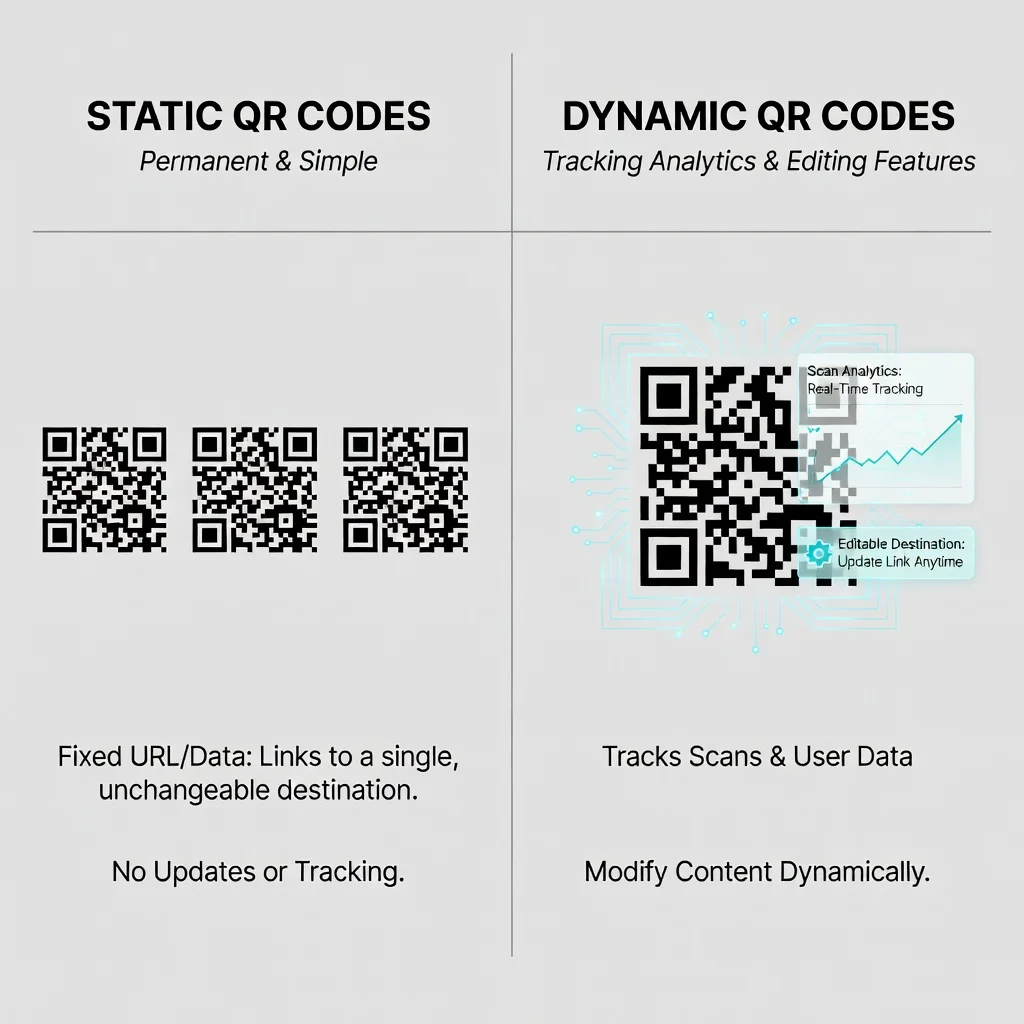
Utilisez des codes QR statiques pour :
- Les informations qui ne changent pas (site web de votre entreprise, numéro de téléphone, e-mail)
- Les emplacements permanents comme les cartes de visite ou la signalétique
- Les situations où vous voulez zéro coût ni entretien récurrent
Utilisez des codes QR dynamiques pour :
- Les campagnes marketing où la destination change (promotions saisonnières, contenus alternés)
- Les situations où vous avez besoin d'un suivi et d'une analytique des performances de scan
- Les campagnes où vous voulez tester différentes pages d'atterrissage
Types de données que vous pouvez encoder
- URL : Dirigez les utilisateurs vers un site web ou une page spécifique.
- Texte simple : Fournissez des informations directement via le code.
- Informations de contact : Partagez des cartes de visite ou des coordonnées sous forme de carte de visite numérique.
- E-mails : Configurez un message e-mail pré-rempli que les utilisateurs peuvent envoyer en un seul scan.
- SMS : Préparez un message texte prédéfini que les utilisateurs peuvent envoyer à un numéro précis.
- Accès Wi-Fi : Partagez en toute sécurité vos identifiants Wi-Fi.
Bonnes pratiques d'utilisation des codes QR
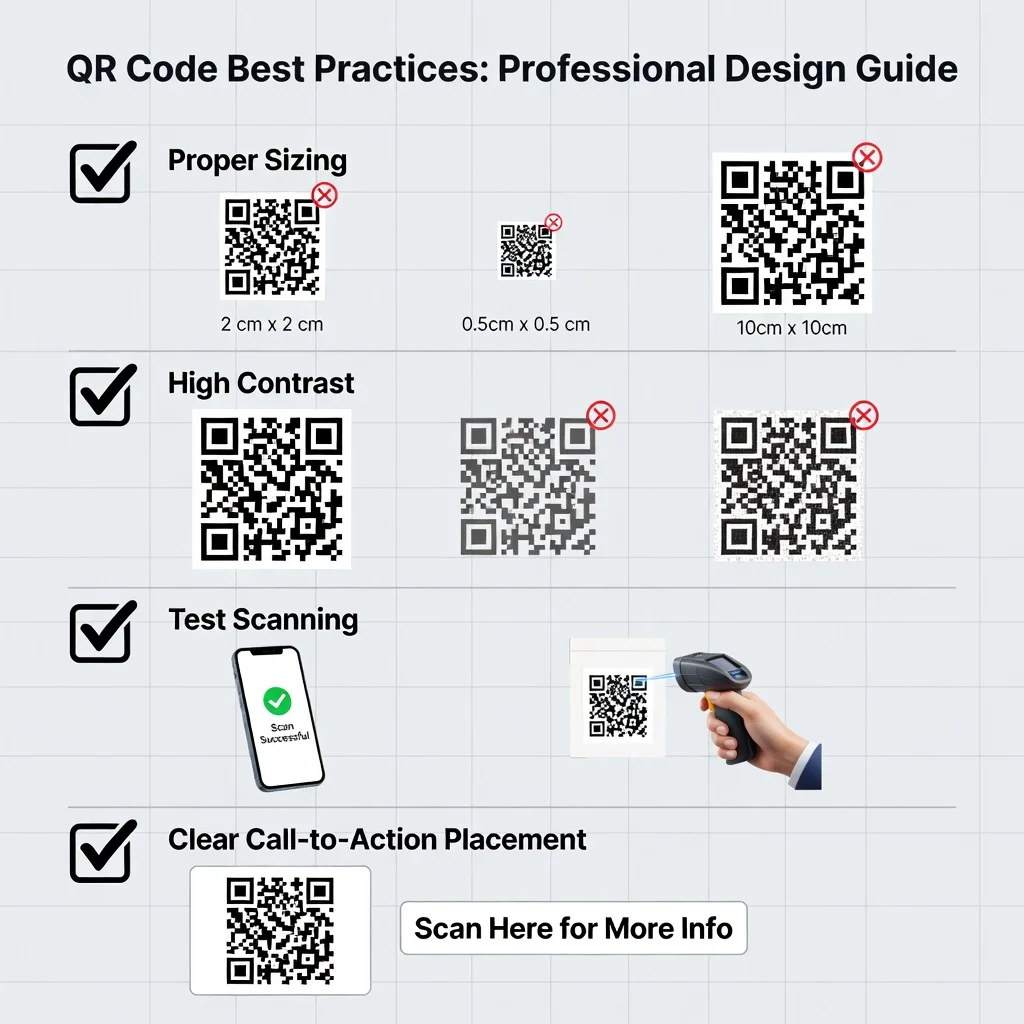
- Taille et emplacement optimaux : Faites des codes d'au moins 2 cm sur 2 cm et placez-les là où les gens peuvent réellement les voir et les scanner facilement.
- Correction d'erreurs : Choisissez le bon niveau de correction d'erreurs pour que votre code reste lisible même si une partie est masquée ou endommagée.
- Testez avant de déployer : Scannez votre code sur plusieurs appareils et applications avant de l'imprimer ou de le publier.
- Contraste élevé : Les codes foncés sur fond clair fonctionnent le mieux. Évitez les combinaisons de couleurs qui rendent le scan difficile.
Conclusion
Les codes QR gratuits sont vraiment utiles. Que vous souhaitiez partager votre site web, votre numéro de téléphone ou vos coordonnées, générer un code ne coûte rien et prend quelques minutes. Le choix entre les codes statiques (gratuits, permanents) et les codes dynamiques (payants, flexibles, traçables) dépend de vos besoins spécifiques. Pour la plupart des gens et la plupart des situations, les codes QR statiques gratuits résolvent parfaitement le problème.