
Einführung in QR-Codes
QR-Codes wurden in den 1990er Jahren in Japan erfunden, um die Fertigung nachzuverfolgen. Sie haben sich zu einem allgegenwärtigen Werkzeug entwickelt, das Menschen mit digitalen Informationen verbindet. Der Strichcode auf einer Müslischachtel ist längst Geschichte; heutzutage sind Codes überall zu finden, von Schaufenstern über Speisekarten in Restaurants bis hin zu Konzertplakaten. Das Beste daran? Sie benötigen keine spezielle Ausrüstung oder teure Software, um einen zu erstellen. Ein Browser und ein Generator sind alles, was Sie brauchen.
Können Sie einen kostenlosen QR-Code erhalten?
Ja, absolut. Sie können QR-Codes kostenlos erstellen. Eine Reihe von Online-Generatoren, darunter freeqrcodegenerator.com, ermöglicht Ihnen die kostenlose Erstellung von Codes. Diese werden als statische QR-Codes bezeichnet und eignen sich perfekt für dauerhafte Informationen, die Sie nicht ändern müssen.
Was sind statische QR-Codes?
Statische QR-Codes kodieren die Daten direkt in das Bild selbst. Einmal erstellt, ist der Inhalt festgelegt. Ihre Telefonnummer, Website-URL oder E-Mail-Adresse bleibt für immer gleich. Der Code läuft nie ab, muss nie aktualisiert werden und erfordert keinerlei Wartung. Diese Einfachheit ist der Grund, warum kostenlose statische Codes so praktisch sind, sie funktionieren einfach auf unbestimmte Zeit.
QR-Codes kostenlos erstellen
- Wählen Sie einen zuverlässigen QR-Code-Generator: Entscheiden Sie sich für ein unkompliziertes Tool wie freeqrcodegenerator.com. Sie brauchen nichts Ausgefallenes.
- Geben Sie Ihre Daten ein: Geben Sie die URL, den Text oder die Kontaktinformationen ein, die Sie kodieren möchten.
- Passen Sie Ihren QR-Code an: Fügen Sie Farben hinzu, ändern Sie Muster oder betten Sie ein Logo ein, das zu Ihrer Marke passt.
- Erstellen und herunterladen: Erstellen Sie den Code und laden Sie ihn in einem Format wie PNG, JPG oder SVG herunter.
Vorteile kostenloser QR-Codes

- Kosteneffizienz: Sie sind kostenlos. Keinerlei finanzielle Ausgaben, während sie ein vielseitiges Werkzeug für Marketing und Informationsaustausch bieten.
- Einfacher Zugang: Jeder mit einer Internetverbindung kann QR-Codes erstellen. Es ist keine spezielle Software erforderlich.
- Große Reichweite: Jedes Smartphone kann sie scannen. Sie schließen niemanden aus.
Ist ein QR-Code lebenslang kostenlos?
Statische Codes, die mit einem kostenlosen Generator erstellt wurden, bleiben für immer funktionsfähig. Sie laufen nicht ab. Sie werden nicht gelöscht. Solange das, worauf Sie verlinken (Ihre Website, E-Mail, Telefonnummer), gleich bleibt, funktioniert Ihr kostenloser statischer Code auf unbestimmte Zeit.
Dynamische QR-Codes bieten mehr Flexibilität, kosten aber Geld. Sie ermöglichen es Ihnen, das Ziel des Codes zu ändern, ohne ihn neu erstellen zu müssen. Nützlich, wenn Sie Kampagnen durchführen, bei denen sich das Ziel ändert, oder wenn Sie Scan-Daten verfolgen möchten. Aber diese Leistungsfähigkeit hat ihren Preis.
Statische vs. dynamische QR-Codes: Welche sollten Sie wählen?
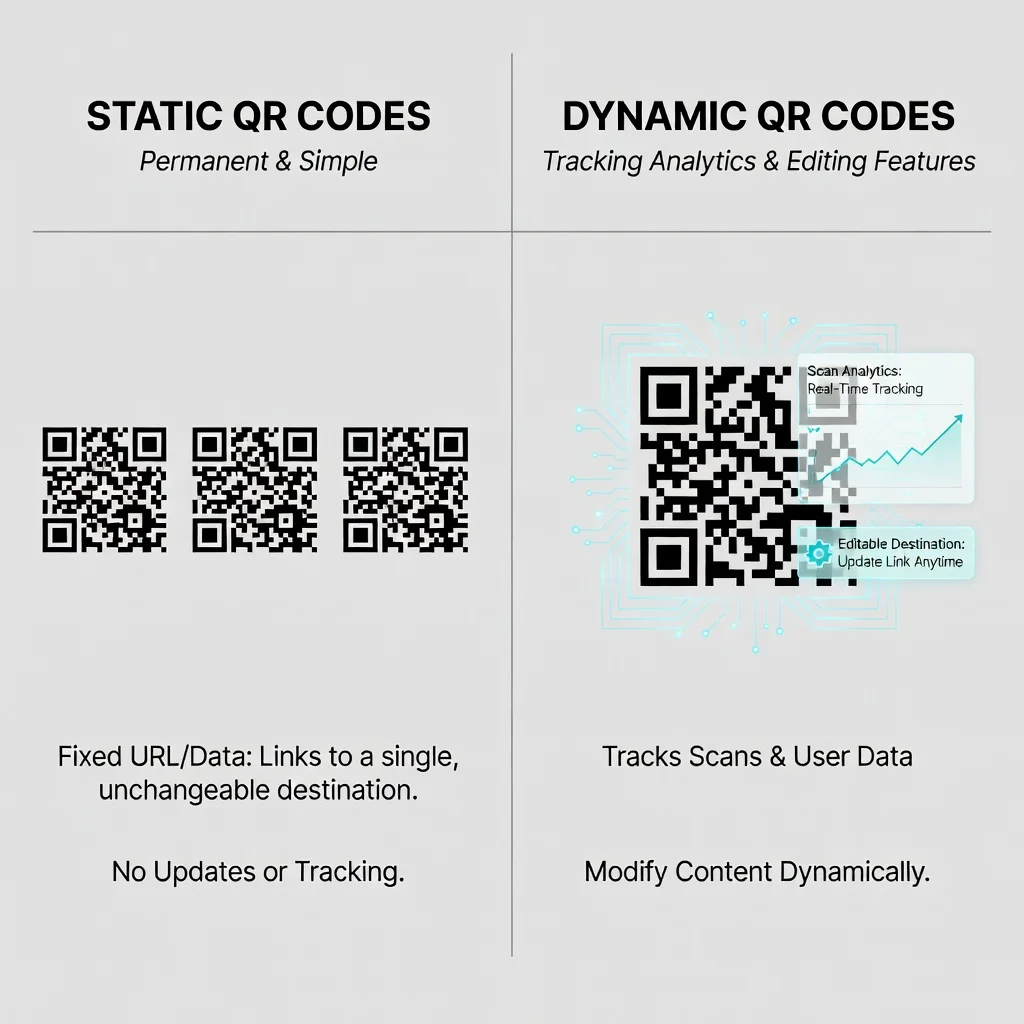
Verwenden Sie statische QR-Codes für:
- Informationen, die sich nicht ändern (Ihre Unternehmenswebsite, Kontaktnummer, E-Mail)
- Dauerhafte Platzierungen wie Visitenkarten oder Beschilderungen
- Situationen, in denen Sie keine laufenden Kosten oder Wartung wünschen
Verwenden Sie dynamische QR-Codes für:
- Marketingkampagnen, bei denen sich das Ziel ändert (saisonale Aktionen, wechselnde Inhalte)
- Situationen, in denen Sie Tracking und Analysen zur Scan-Leistung benötigen
- Kampagnen, in denen Sie verschiedene Landingpages testen möchten
Arten von Daten, die Sie kodieren können
- URLs: Leiten Sie Nutzer zu einer Website oder einer bestimmten Webseite.
- Klartext: Stellen Sie Informationen direkt über den Code bereit.
- Kontaktinformationen: Teilen Sie Visitenkarten oder Kontaktdaten in einem digitalen Visitenkartenformat.
- E-Mails: Richten Sie eine vorausgefüllte E-Mail-Nachricht ein, die Nutzer mit einem einzigen Scan senden können.
- SMS: Bereiten Sie eine vordefinierte Textnachricht vor, die Nutzer an eine bestimmte Nummer senden können.
- WiFi-Zugang: Teilen Sie WiFi-Zugangsdaten sicher.
Best Practices für die Verwendung von QR-Codes
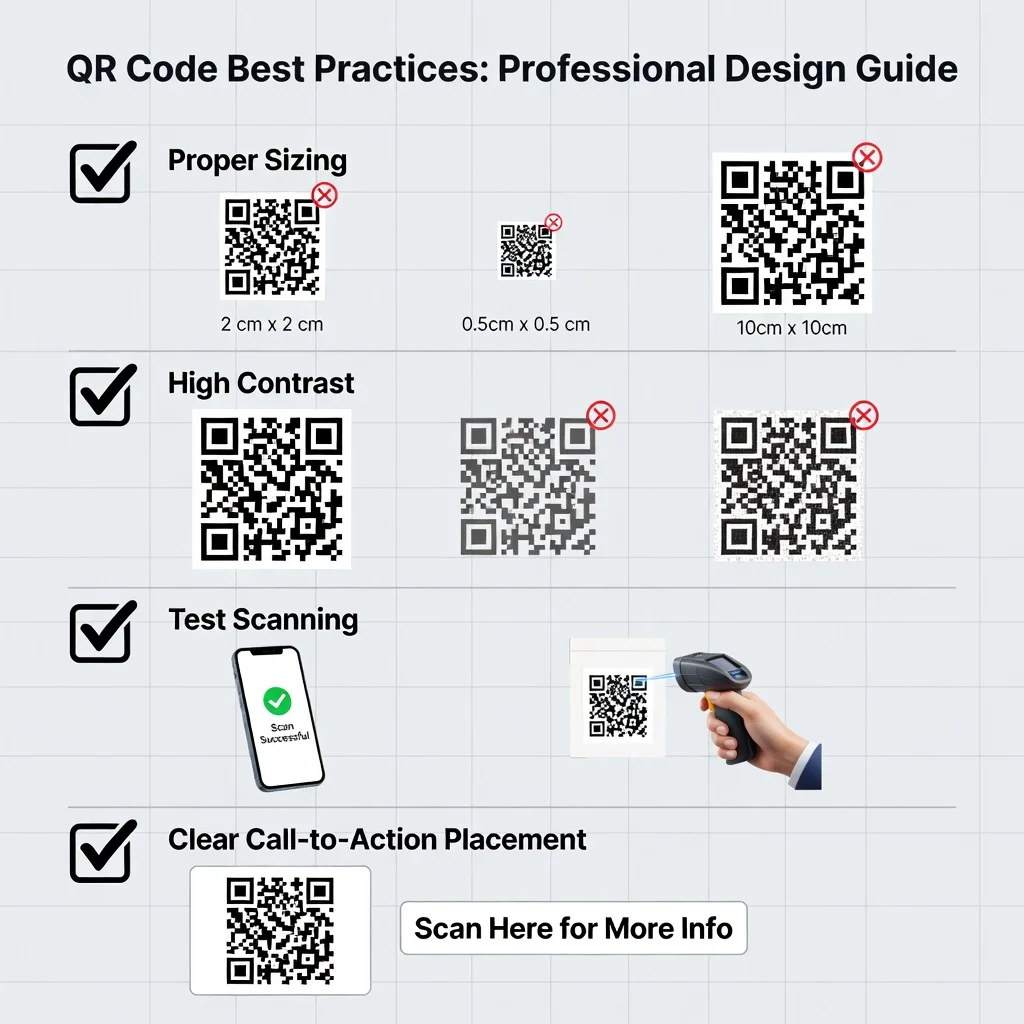
- Optimale Größe und Platzierung: Gestalten Sie Ihre Codes mindestens 2×2 cm groß und platzieren Sie sie dort, wo die Menschen sie tatsächlich sehen und leicht scannen können.
- Fehlerkorrektur: Wählen Sie die richtige Fehlerkorrekturstufe, damit Ihr Code lesbar bleibt, selbst wenn ein Teil davon verdeckt oder beschädigt wird.
- Vor dem Einsatz testen: Scannen Sie Ihren Code auf mehreren Geräten und mit verschiedenen Apps, bevor Sie ihn drucken oder veröffentlichen.
- Hoher Kontrast: Dunkle Codes auf hellem Hintergrund funktionieren am besten. Vermeiden Sie Farbkombinationen, die das Scannen erschweren.
Fazit
Kostenlose QR-Codes sind wirklich nützlich. Egal, ob Sie Ihre Website, Telefonnummer oder Kontaktdaten teilen möchten, die Erstellung eines Codes kostet nichts und dauert nur Minuten. Die Wahl zwischen statischen Codes (kostenlos, dauerhaft) und dynamischen Codes (kostenpflichtig, flexibel, nachverfolgbar) hängt von Ihren spezifischen Anforderungen ab. Für die meisten Menschen und die meisten Situationen lösen kostenlose statische QR-Codes das Problem perfekt.